Extra Invoice Print Button
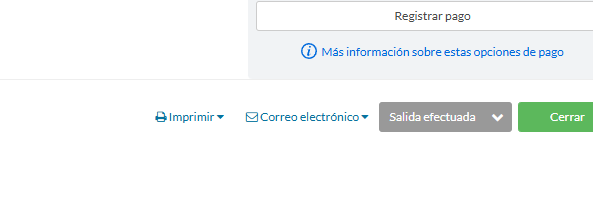
This script puts a Print Invoice button directly on the Little Hotelier reservation screen, next to the existing Print menu. One click opens the invoice, with no menu to open first. It is for front desk staff who print or download an invoice at almost every check-out.
The problem it solves
In Front Desk, the invoice sits inside the reservation's Print menu: you open the menu, then choose the invoice. Two clicks is not much once, but at check-out time, with guests waiting, it adds up, and on a tablet the small menu is easy to miss. New staff also don't always know the invoice is inside that menu.
What changes
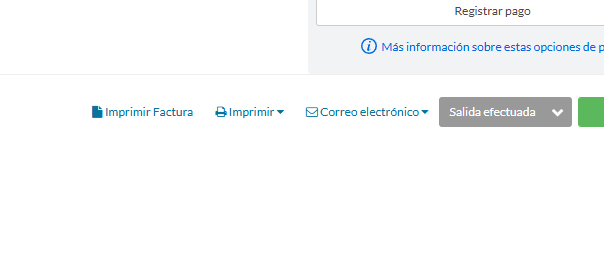
- A new button with a document icon appears in the reservation footer, right after the Print menu button.
- Its label is Print Invoice, or Imprimir Factura when Little Hotelier is in Spanish.
- Clicking it triggers Little Hotelier's own invoice print link, the same one you would choose from the Print menu. The result is exactly the invoice Little Hotelier produces; the script does not create or change invoices.
- The original Print menu stays as it is, with all its other options.
How to install
You need the free Tampermonkey extension. Press Install on Tampermonkey on this page, confirm, and reload Little Hotelier. The installation guide has pictures for each step. The script runs on Front Desk pages at app.littlehotelier.com and only adds the button where the reservation Print button exists. It is free and open source: see the code on GitHub.
Good to know
- The script looks for the Print button a few times during the first five seconds after the page loads. If the button is missing because the reservation opened later, reload the page.
- It checks first whether its button is already there, so you never get two.
- Labels exist in English and Spanish. Other interface languages show the English label.
- It works on desktop and touch screens. With Improve Style For Touch Screens, the footer buttons also get a highlighted background.
- It stores nothing and sends nothing outside Little Hotelier.