The INE survey, filled in and sent
Arrivals and overnight stays by region and country are prepared from your reservations and submitted to the INE for you.

Arrivals by origin, August
- Madrid34%
- Catalunya21%
- Andalucía15%
- France12%
- Germany10%
- United Kingdom8%
What it does
- Stable
Guest origins
Arrivals and nights by Spanish region or country, rooms occupied and average rate.
- Stable
Direct submission
Sent to the INE through IRIA, with the receipt saved.
- Stable
Report history
Every month's report, whether it was sent and its receipt.
The INE hotel occupancy survey from Little Hotelier
INE reports build Spain's INE hotel occupancy survey from your Little Hotelier reservations: arrivals and overnight stays by Spanish region or country, rooms occupied, extra beds and average rate by client type. Hotelier Tools validates the figures, sends the XML through the INE's IRIA system and keeps the receipt.
How it works
- Set up your establishment once. On INE Setup (
/ine-setup), enter your IRIA order number (NOrden) and password, press Test IRIA connection, and fill in the address, capacity, type and category for the XML header. - Generate the report. On Guest Origins (
/reports/guest-origins), pick the dates in the INE's request and press Generate report. Tabs split the result into daily summary, guest origin, rooms, ADR by client and data quality. - Fix guests with no origin. Reservations without a nationality or province are flagged. Correct them in Little Hotelier and refresh only those rows.
- Validate, preview and send. Press Validate for the INE, then Preview XML, then Send to the INE. The INE's receipt is stored with the report.
- Keep the history. Saved Reports (
/reports/list) lists every month with its status and receipt.
If the mailbox that receives the INE's emails is connected to the guest inbox, the INE's request shows a button that generates the report for exactly the requested dates.
What the survey asks, the fines and the IRIA rejections to avoid are in how to fill in the INE hotel occupancy survey.
What you need
- A request from the INE with your order number and password. The survey only applies once the INE selects your establishment.
- Little Hotelier connected on Credentials.
- Guest country and province filled in. The INE counts guests by where they live, not their nationality. The free Easy Save Province and Country script and automated checks help keep them complete.
Limits and good to know
- Status: stable.
- It builds the hotel questionnaire for hotel-type establishments: hotels, hostales and pensiones. Tourist apartments, campsites, rural houses and albergues answer other INE questionnaires.
- A sent report can no longer be changed or deleted, but you can still download its XML.
- Your IRIA password is stored encrypted and never shown in clear text.
- In the public demo, sending to the INE is switched off. Never type real IRIA credentials there.
- Hotelier Tools is not affiliated with the INE, SiteMinder or Little Hotelier.
Guides about INE reports
All guides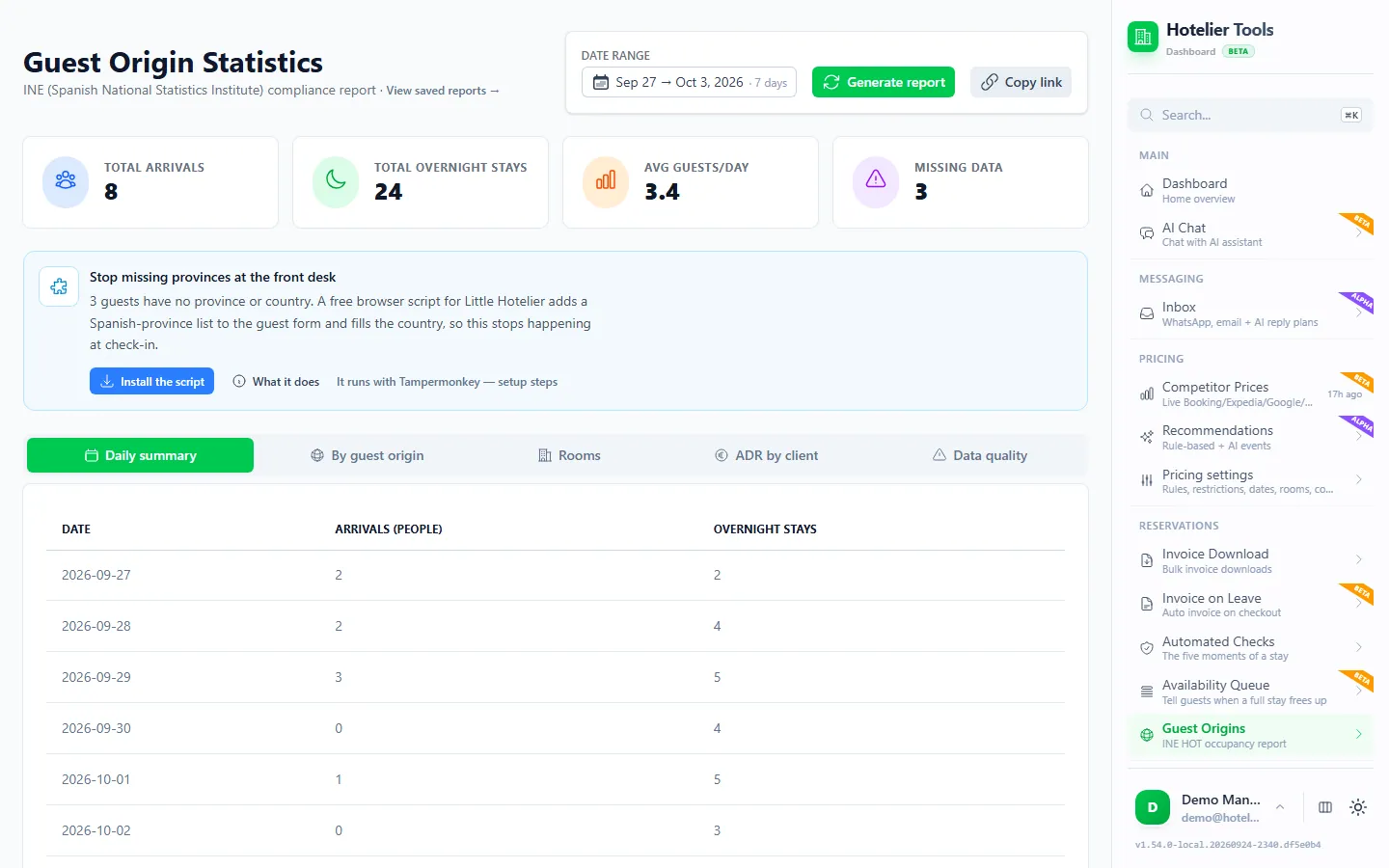
Free until 10 January 2027
Use every feature, including the ones in beta and alpha, and help us shape what comes next.
From today to 9 January 2027
0 €
Free for every hotel.
- Every feature included
- No card needed
- Your feedback shapes the roadmap
- 10 January 2027Billing starts
Throughout 2027
50 €/ month
For hotels that try Hotelier Tools in 2026.
- Start using it before 31 December 2026
- The price stays the same all through 2027
- Per hotel, per month
More from the dashboard
- BetaOverviewYour property at a glanceSee what is connected, what is running and who arrives next as soon as you sign in, and find any page by typing what you need.Learn more
- StableInvoicingA whole quarter of invoices in one clickPick a date range and get every invoice from Little Hotelier as PDFs in one ZIP, with a CSV summary for your accountant.Learn more
- BetaChecksCatch problems before the guest arrivesEvery reservation is checked at five moments of the stay, so you see what needs attention, from a missing ID to an unpaid balance.Learn more
- AlphaDynamic pricingPrices that follow your marketCompare your rates with similar hotels on Booking.com, Expedia, Google Hotels, Hostelworld and Agoda, and get a recommended price for every room and night.Learn more
- AlphaGuest inboxWhatsApp, email and Booking.com in one inboxEvery guest conversation in one list, next to the reservation. The assistant drafts answers from your own FAQ and house notes.Learn more
- BetaAI assistantAsk the dashboard to do it for youType or say what you need. The assistant finds the reservation, checks availability and shows you the change before anything happens.Learn more
- BetaWaitlistTell guests when a sold-out stay opens upWatch dates that are full. When every night frees up, the guest or your team gets one message by email or WhatsApp.Learn more
- BetaAutomationsTasks that run while you sleepSchedule checks, invoices, price updates and inbox polling. Every run is logged and failures reach your email.Learn more
- BetaAPI and MCPConnect your own tools and AI assistantsA documented REST API and an MCP server let you use your hotel data from your own software, Claude, Cursor or VS Code.Learn more
Missing something your hotel needs?
Tell us what would save you time. We read every request and use them to decide what to build next.