Documentation for Hotelier Tools
Complete guides, tutorials and technical references to get the most out of our hotel management tools.
Content
Getting Started with Hotelier Tools
Hotelier Tools is a set of tools designed specifically to optimize hotel management using Little Hotelier by Siteminder.
What does Hotelier Tools include?
Web enhancement scripts
- • User interface improvement
- • Commission calculator
- • Optimized data visualization
- • Additional functionalities
Automations
- • Automatic check-out
- • Payment validation
- • Invoice management
- • Reservation monitoring
System requirements
- • For improvement scripts: Browser compatible with Tampermonkey (Chrome, Edge, Firefox, Safari and similar)
- • For automations: Active Little Hotelier account with access to FrontDesk and Direct Booking reservations
- • User access: Email and password
Improvement scripts do not work in standard mobile browsers like Chrome for Android or Safari for iOS.
Alternative for Android: Kiwi Browser is compatible with Tampermonkey, although its configuration is more complex.
Web enhancement scripts
Web enhancement scripts directly optimize Little Hotelier's interface in your browser, providing an improved user experience and additional functionalities.
Browser compatibility
Desktop browsers
- • Chrome (recommended)
- • Microsoft Edge
- • Mozilla Firefox
- • Safari
- • Opera
Mobile browsers
❌ Chrome/Safari standard mobile
✅ Kiwi Browser (Android)
*More complex configuration
Automations
Automations perform repetitive tasks in your hotel automatically, saving time and reducing human errors.
Access credentials
To use automations, we need you to provide access credentials to your Little Hotelier account. These credentials must have limited permissions to ensure the security of your information.
Create a user from the Little Hotelier administration panel with the following permissions:
Direct Booking
- • Access: Yes
- • User Type: General
FrontDesk
- • Access: Yes
- • User Type: General
- • Permissions: Reservations
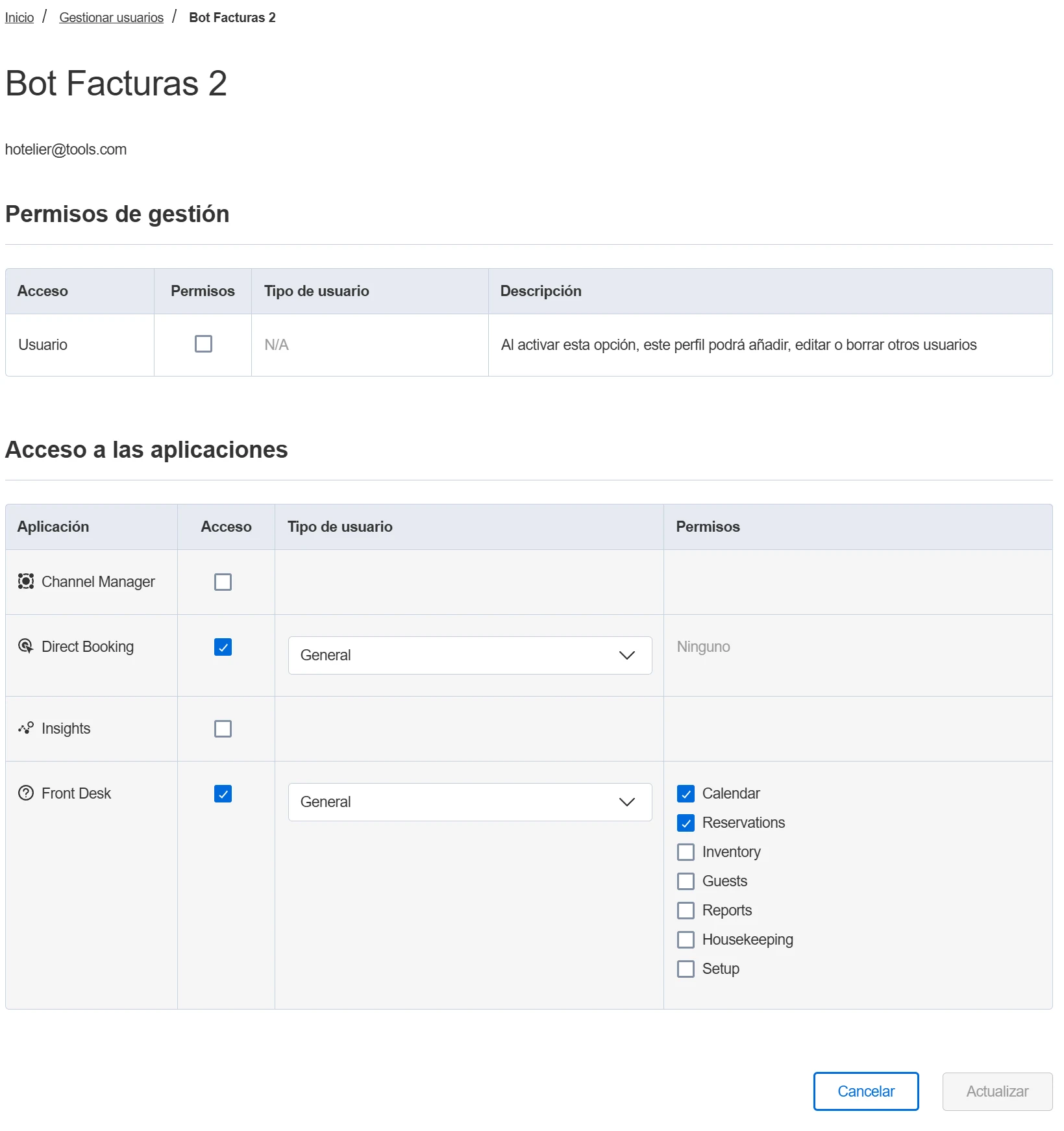
Once the user is created, make sure it works by accessing Little Hotelier with the newly created username and password.
Once you have the user created, please contact us through the contact form so we can configure the automations indicating the username and password created, telling us which automations you are interested in.
Available automations
View all available automationsAPI Reference
We currently use the APIs available on the Little Hotelier website.
In the future we will try to connect with the SiteMinder API directly to have more robustness and stability.
Frequently Asked Questions
Yes, all our tools are designed with the highest security standards. Extensions only modify the visual interface and automations use limited access credentials with minimal permissions.
No, our tools are designed to be easy to use. Extensions install with just a few clicks and we configure automations for you. We provide step-by-step guides for everything.
We constantly monitor changes in Little Hotelier and update our tools to maintain compatibility. Updates are automatic and transparent to the user.
Absolutely. We offer custom tool development according to your hotel's specific needs. Our technical team will work with you to create tailored solutions.
Yes, we offer technical support during specific hours. You can contact us via email and we will respond as quickly as possible. We also have complete documentation available.
No, our tools are optimized to not affect platform performance. Extensions only modify the visual presentation and automations work independently.
Within the Tampermonkey administration panel you will get a notification to update the scripts, although you can always copy and paste the latest version from the repository.
The scripts do not work in standard mobile browsers like Chrome for Android or Safari for iOS. However, on Android you can use Kiwi Browser which is compatible with Tampermonkey, although the configuration is more complex.
Automations only require limited read and write permissions on your Little Hotelier account. We never request full administrative permissions and only access the minimum data necessary.
Yes, you can pause any automation by contacting our support. We are working on a control panel where you can manage all your automations. You can also disable the provided user and the automations will stop working.
The dashboard is free for every hotel until 9 January 2027. Billing starts on 10 January 2027, and hotels that try it in 2026 pay 50 € per month throughout 2027. The browser scripts stay free.
We only access the minimum data necessary for each function. We do not store sensitive guest or financial information. All data is processed securely.
All of this lives in the Hotelier Tools dashboard
Invoices, checks, prices, guest messages and INE reports for Little Hotelier. Free until 10 January 2027.