WhatsApp, email and Booking.com in one inbox
Every guest conversation in one list, next to the reservation. The assistant drafts answers from your own FAQ and house notes.

- WLaura MartínWhatsApp
- BThomas WeberBooking.com
- @Akira SatoGmail
- OMarie DuboisOutlook
Drafts ready in 2 more conversations
What it does
- Alpha
One inbox
WhatsApp, Gmail, Outlook, any email account and Booking.com messages.
- Alpha
Automatic drafts
Every new WhatsApp or Booking.com message gets a reply ready for you to check and send.
- Alpha
Booking.com questions
Questions guests ask on your Booking.com page are answered from the same inbox.
- Alpha
Reply modes per channel
Off, drafts for you to review, or automatic replies after a delay you choose.
- Alpha
Answers from your FAQ
The assistant only uses what you have written about your property.
- Alpha
Teach by example
Correct a reply once and the assistant learns from it.
- Alpha
Safe by design
The assistant only talks about the verified guest's own booking and never changes anything without you.
One guest inbox for WhatsApp, email and Booking.com
The guest inbox puts WhatsApp, email and Booking.com messages in one list, with the Little Hotelier reservation next to each conversation. An AI drafts each reply from your own FAQ and house notes, and by default a person approves it before anything is sent.
How it works
- Connect your channels. Booking.com through Credentials > Booking.com extranet with your partner login and second factor. Email from Google, Microsoft or any IMAP/SMTP account. WhatsApp through a WhatsApp Web session (WAHA).
- Messages arrive next to the booking. A Booking.com thread is linked to its reservation automatically. Guest Q&A questions from your Booking.com page arrive in the same inbox.
- Choose a reply mode per account on Channels (
/messaging/channels): Off, Draft (the default, nothing happens until you approve), Automatic reply after a delay you choose, or Autonomous. - Teach it your answers. On FAQ & knowledge (
/messaging/faq), add your FAQ page or text and house notes such as wifi and parking. Correct a reply once and the assistant learns from it. - Invoice requests are recognized without AI. Booking.com's invoice-request messages offer to enroll the stay for its invoice at checkout.
Setup details per channel: WhatsApp with Little Hotelier and managing Booking.com guest messages.
What you need
- Little Hotelier connected on Credentials, and your property card filled in on
/settings/property. - For WhatsApp, a WAHA server: its address, a session name and an API key.
- AI credits. Each message the AI reads and drafts uses them, shown on AI credits (
/messaging/credits).
Limits and good to know
- Status: alpha. It is an early version and changes often.
- Booking.com stays person-sent. The AI never sends to Booking.com guests on its own. Sending your approved reply back to Booking.com from the inbox is not promised yet: copy it into the Extranet or Pulse.
- The guest AI has no tools. It returns a plan from a closed list and can never cancel, change dates or touch payments.
- It only sees a booking for a verified sender: a phone matching the last 8 digits, the exact email, or a Booking.com thread.
- A service you haven't listed is answered "to confirm", never yes.
- WhatsApp through WAHA is not the official API. A number used this way could be blocked, so only reply to guests who write first. Group chats are ignored.
- Automatic replies stop at 4 an hour or 12 a day.
Guides about Guest inbox
All guides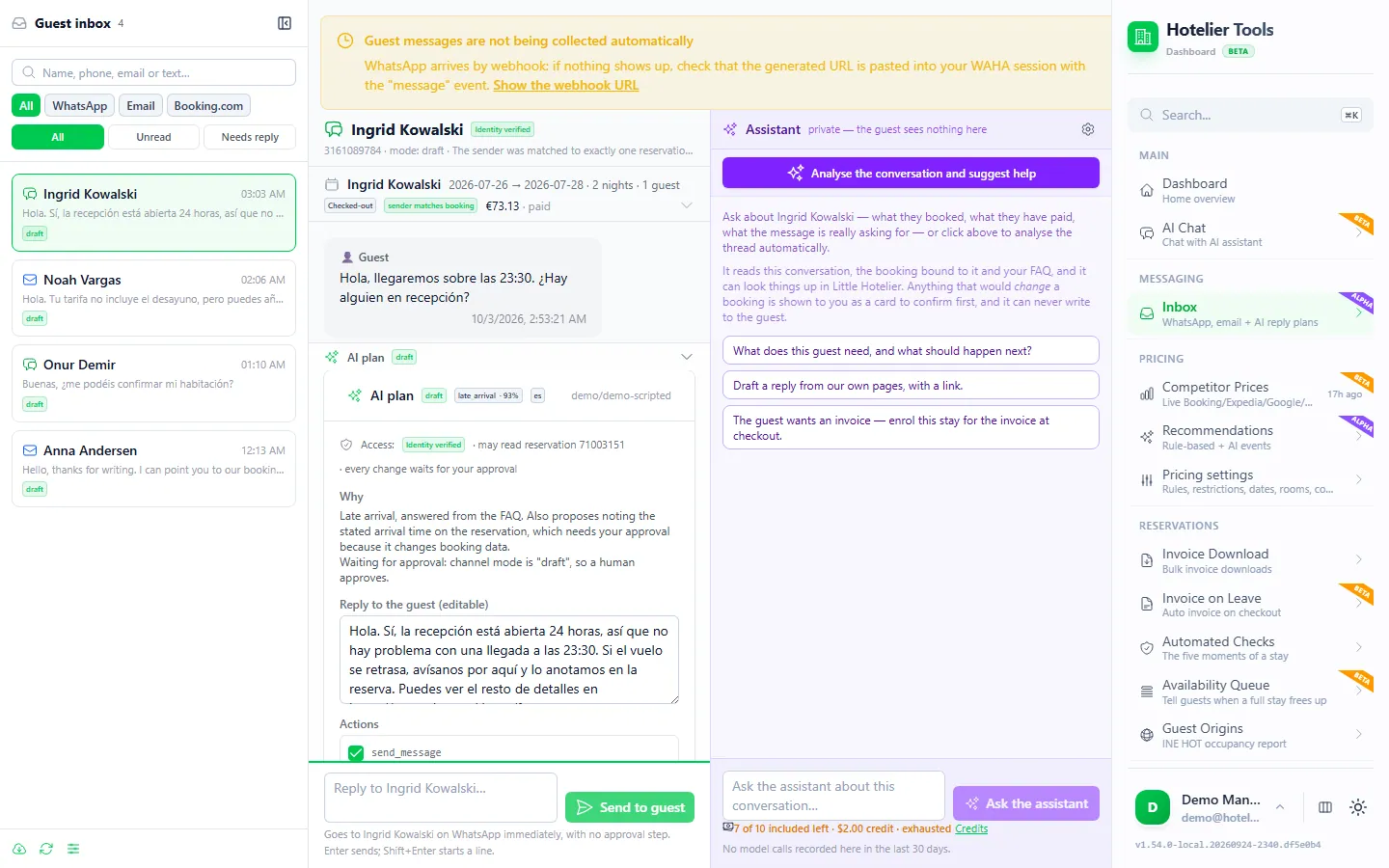 Guest messages
How to use WhatsApp with Little Hotelier (Messaging hub, WhatsApp Business and other options)
Little Hotelier's Messaging hub uses the official WhatsApp Business API. Compare it with the free WhatsApp Business app and a shared inbox, with templates.
Read the guide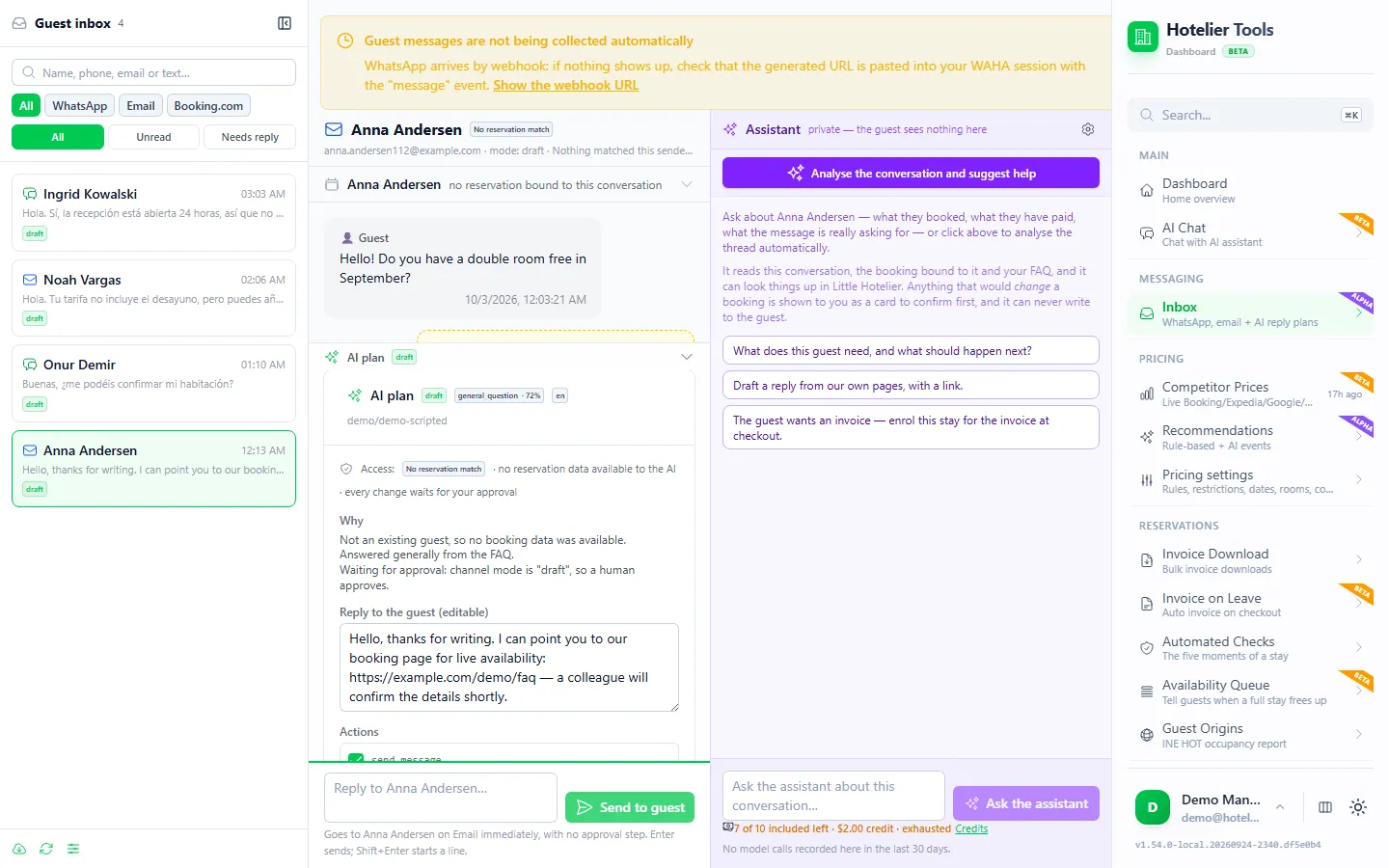 Guest messages
How to manage Booking.com guest messages without living in the extranet
Pulse, templates, scheduled messages and auto-replies, how to spot fake Booking.com messages, and one inbox for Booking.com, WhatsApp and email.
Read the guide
Free until January 10, 2027
Use every feature, including the ones in beta and alpha, and help us shape what comes next.
From today to January 9, 2027
0 €
Free for every hotel.
- Every feature included
- No card needed
- Your feedback shapes the roadmap
- January 10, 2027Billing starts
Throughout 2027
50 €/ month
For hotels that try Hotelier Tools in 2026.
- Start using it before 31 December 2026
- The price stays the same all through 2027
- Per hotel, per month
More from the dashboard
- BetaOverviewYour property at a glanceSee what is connected, what is running and who arrives next as soon as you sign in, and find any page by typing what you need.Learn more
- StableInvoicingA whole quarter of invoices in one clickPick a date range and get every invoice from Little Hotelier as PDFs in one ZIP, with a CSV summary for your accountant.Learn more
- BetaChecksCatch problems before the guest arrivesEvery reservation is checked at five moments of the stay, so you see what needs attention, from a missing ID to an unpaid balance.Learn more
- AlphaDynamic pricingPrices that follow your marketCompare your rates with similar hotels on Booking.com, Expedia, Google Hotels, Hostelworld and Agoda, and get a recommended price for every room and night.Learn more
- BetaAI assistantAsk the dashboard to do it for youType or say what you need. The assistant finds the reservation, checks availability and shows you the change before anything happens.Learn more
- StableINE reportsThe INE survey, filled in and sentArrivals and overnight stays by region and country are prepared from your reservations and submitted to the INE for you.Learn more
- BetaWaitlistTell guests when a sold-out stay opens upWatch dates that are full. When every night frees up, the guest or your team gets one message by email or WhatsApp.Learn more
- BetaAutomationsTasks that run while you sleepSchedule checks, invoices, price updates and inbox polling. Every run is logged and failures reach your email.Learn more
- BetaAPI and MCPConnect your own tools and AI assistantsA documented REST API and an MCP server let you use your hotel data from your own software, Claude, Cursor or VS Code.Learn more
Missing something your hotel needs?
Tell us what would save you time. We read every request and use them to decide what to build next.