Ask the dashboard to do it for you
Type or say what you need. The assistant finds the reservation, checks availability and shows you the change before anything happens.

- Reservation found
- Room 3 is free on those nights
- The price stays the same
Change dates
Oct 12 – 14 Oct 14 – 16
Laura Martín, room 3, 2 nights
What it does
- Beta
Assistant chat with voice
Ask about bookings, prices or guests by text or voice.
- Beta
You approve every change
Each change appears as a card you approve or reject.
- Alpha
Staff assistant
Your team asks questions over WhatsApp or email, and proposed changes wait for you.
- Coming soon
Team accounts
Owner, manager and staff roles in one account.
An AI assistant for your Little Hotelier front desk
The AI assistant answers questions about your Little Hotelier bookings, guests, prices, invoices, checks and waitlist in plain words, and prepares changes for you. It reads freely, but every change appears as a card you approve or reject before anything reaches Little Hotelier.
How it works
- Ask in the chat. Open AI Chat (
/chat) and type a request, such as who arrives tomorrow and who still owes money. Answers come back as text and cards: reservation summaries, a proposed change with an evidence table, or a price-recommendations table. - Approve or reject. Every write needs a card. If the system cannot tell whether a tool reads or writes, it treats it as a write. The card shows the value in Little Hotelier next to the new one and where it came from.
- Approve runs exactly that change. The stored call runs on the server, and the AI gets no second chance to rewrite it. Each approval works once and expires after 24 hours. Refunds always sit behind their own card.
- Your staff can ask too. On Staff assistant (
/staff), register an employee with their WhatsApp number or email and a role: Read only or Can request changes. They write to your connected number or mailbox, and any change they ask for waits for the owner's approval.
Real requests and what happens after each one are in AI assistant for a small hotel front desk.
What you need
- Little Hotelier connected on Credentials.
- Your property card on
/settings/property, read from Little Hotelier. - For the staff assistant, a connected WhatsApp number or mailbox.
- AI credits: each answer uses them, and your balance is on AI credits.
Limits and good to know
- Status: the chat and approvals are in beta, the staff assistant is in alpha, and team accounts with owner, manager and staff roles are coming soon.
- Voice is Spanish for now. The microphone uses your browser's speech recognition set to Spanish (es-ES). You can type in any language.
- Staff identity is the sender. A registered phone number, or an email that passes DKIM/DMARC checks. Staff messages older than 30 minutes are not answered.
- Outside the dashboard there is no card. When Claude or ChatGPT calls a write tool through the MCP server, it runs straight away, and refunds are blocked there.
Guides about AI assistant
All guides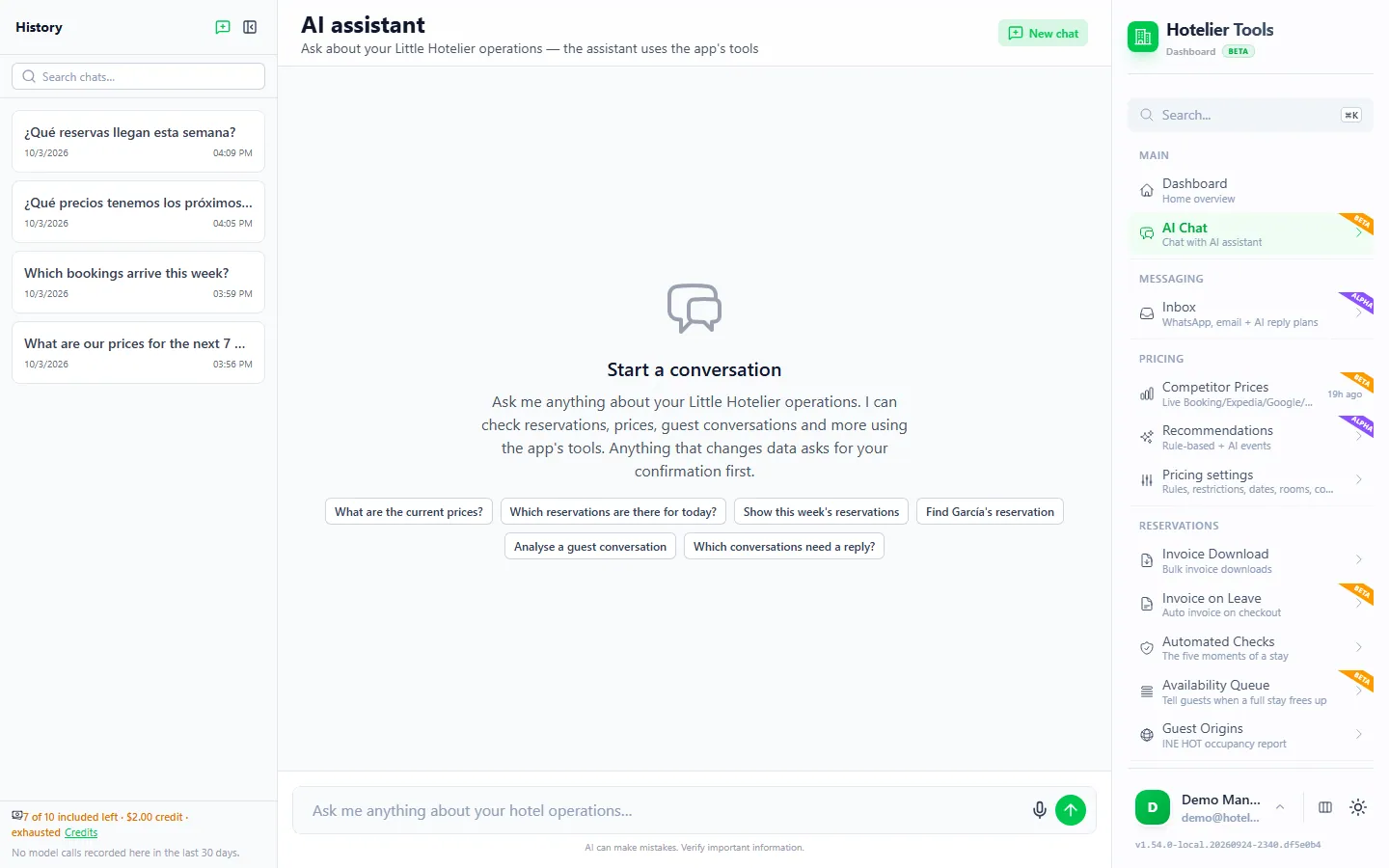
Free until January 10, 2027
Use every feature, including the ones in beta and alpha, and help us shape what comes next.
From today to January 9, 2027
0 €
Free for every hotel.
- Every feature included
- No card needed
- Your feedback shapes the roadmap
- January 10, 2027Billing starts
Throughout 2027
50 €/ month
For hotels that try Hotelier Tools in 2026.
- Start using it before 31 December 2026
- The price stays the same all through 2027
- Per hotel, per month
More from the dashboard
- BetaOverviewYour property at a glanceSee what is connected, what is running and who arrives next as soon as you sign in, and find any page by typing what you need.Learn more
- StableInvoicingA whole quarter of invoices in one clickPick a date range and get every invoice from Little Hotelier as PDFs in one ZIP, with a CSV summary for your accountant.Learn more
- BetaChecksCatch problems before the guest arrivesEvery reservation is checked at five moments of the stay, so you see what needs attention, from a missing ID to an unpaid balance.Learn more
- AlphaDynamic pricingPrices that follow your marketCompare your rates with similar hotels on Booking.com, Expedia, Google Hotels, Hostelworld and Agoda, and get a recommended price for every room and night.Learn more
- AlphaGuest inboxWhatsApp, email and Booking.com in one inboxEvery guest conversation in one list, next to the reservation. The assistant drafts answers from your own FAQ and house notes.Learn more
- StableINE reportsThe INE survey, filled in and sentArrivals and overnight stays by region and country are prepared from your reservations and submitted to the INE for you.Learn more
- BetaWaitlistTell guests when a sold-out stay opens upWatch dates that are full. When every night frees up, the guest or your team gets one message by email or WhatsApp.Learn more
- BetaAutomationsTasks that run while you sleepSchedule checks, invoices, price updates and inbox polling. Every run is logged and failures reach your email.Learn more
- BetaAPI and MCPConnect your own tools and AI assistantsA documented REST API and an MCP server let you use your hotel data from your own software, Claude, Cursor or VS Code.Learn more
Missing something your hotel needs?
Tell us what would save you time. We read every request and use them to decide what to build next.